Blog / · 4 min read
TikTok ads creative specs in 2026: sizes, formats, and safe zones
Veikka Grundström Founder, upload.ad
On this page
Nothing kills launch momentum like a batch of TikTok creatives bouncing back with rejection errors after the edit is already approved. Most rejections are not policy problems, they are spec problems: wrong aspect ratio, bitrate too low, text sitting under the UI overlay.
Here is every spec that matters for TikTok in-feed ads in 2026, plus the export settings and safe zones that keep a batch from bouncing.
Video specs for in-feed ads
| Spec | Requirement | What to actually use |
|---|---|---|
| Aspect ratio | 9:16, 1:1, or 16:9 | 9:16, always |
| Resolution | ≥ 540 x 960 (9:16) | 1080 x 1920 |
| File type | MP4, MOV, MPEG, AVI, 3GP | MP4 (H.264) |
| Duration | 5 to 60 seconds | 15 to 34 seconds |
| File size | Up to 500 MB | Under 100 MB |
| Bitrate | ≥ 516 kbps | 8 to 12 Mbps at 1080p |
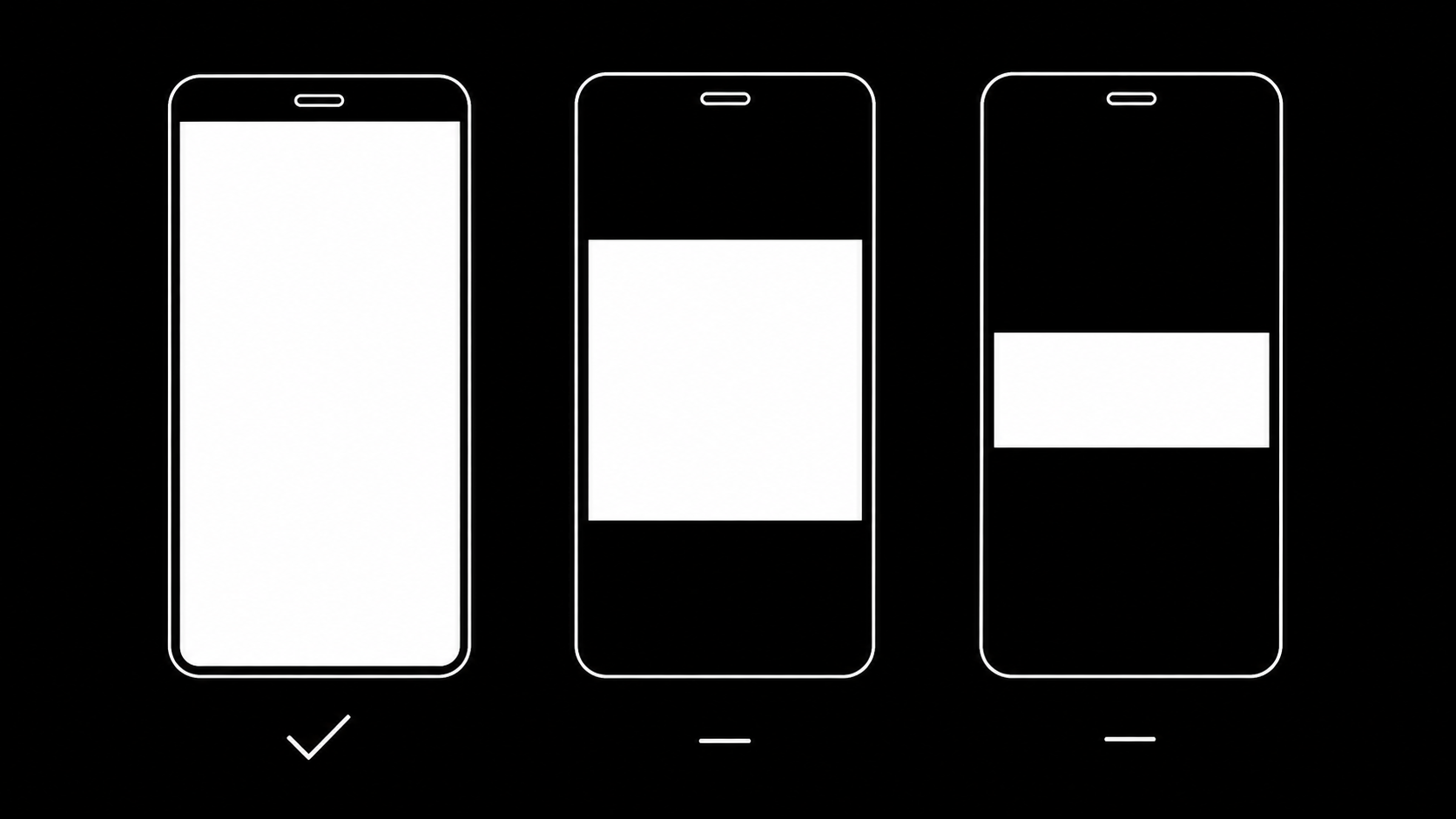
Two notes on the "what to use" column:
- Always ship 9:16. Square and horizontal are accepted, but they render letterboxed in the feed and reliably underperform. If the source footage is horizontal, reframe it rather than uploading 16:9.
- Duration sweet spot. TikTok's own guidance recommends 21 to 34 seconds for in-feed ads. Hooks still decide everything in the first 2 seconds, but sub-10-second cuts often cannot complete the story the algorithm optimizes toward.
Image specs (carousel and catalog formats)
Static images only appear in specific placements (carousel ads, and catalog-driven formats):
- Aspect ratio: 9:16 or 1:1
- Resolution: 1080 x 1920 (vertical) or 1080 x 1080 (square)
- File type: JPG or PNG
- File size: up to 100 MB per image
The safe zone: where the UI eats your creative
TikTok overlays its own interface on top of your video. Anything placed in these regions gets covered by the caption, buttons, or nav bars:
- Top ~130 px (of a 1920 px canvas): status area and top navigation.
- Bottom ~480 px: ad caption, CTA button, and nielsen text stack up here. This is the zone that catches most teams.
- Right ~140 px: like, comment, share, and profile buttons.
- Left ~60 px: margin where descriptions wrap.
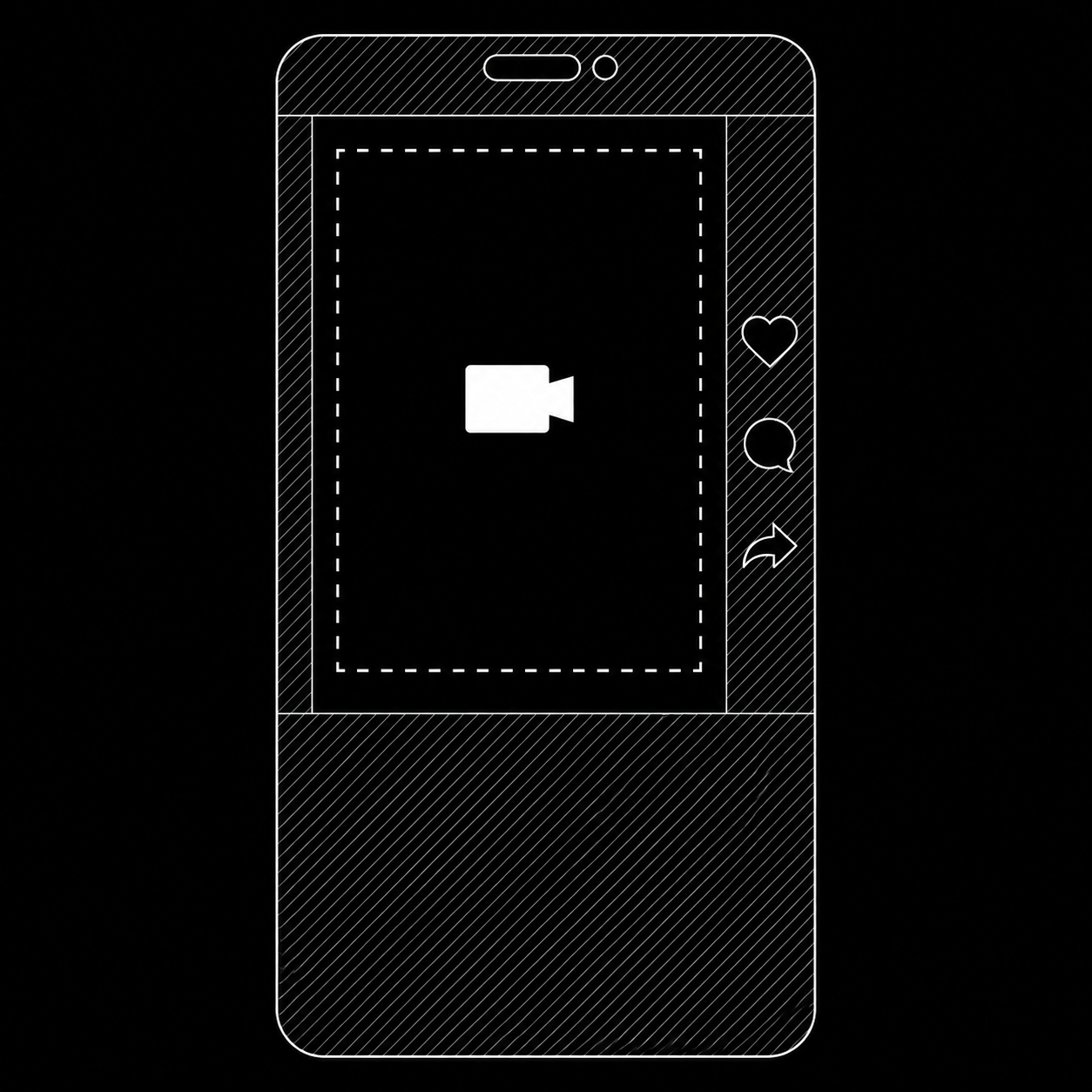
Practical rule: keep logos, product text, captions, and any legally required disclaimers inside the center 1080 x 1310 area, roughly the middle two-thirds of the frame. Burned-in subtitles sit safest slightly above vertical center.
If you run the same vertical cut on Meta Reels, the safe zones do not match exactly: Reels reserves more of the bottom for its caption block. A center-weighted composition passes both, which is why teams buying on both platforms (most of our customers) standardize on one 9:16 master with a conservative safe zone.
Export settings that avoid rejections
From Premiere, Resolve, or CapCut, this export profile clears TikTok's checks:
- H.264 codec in an MP4 container, High profile
- 1080 x 1920, 30 fps (60 fps is fine but doubles file size for little gain)
- Target bitrate 10 Mbps, VBR 2-pass
- AAC audio, 128 kbps or higher, 44.1 kHz. Do not ship silent video, TikTok flags ads without audio
- No black frames at the start, the first frame doubles as the thumbnail in several placements
Common rejection reasons that look like spec errors
- Low resolution: upscaled 720p footage gets flagged as "video quality too low" even though it technically meets the minimum.
- Text overload: dense burned-in text near the caption zone reads as poor quality and drags delivery even when approved.
- Wrong music rights: commercial accounts must use the Commercial Music Library or licensed/original audio. Trending sounds from the organic app are not cleared for ads.
- Borders and letterboxing: padded 1:1 video inside a 9:16 canvas is treated as low-quality creative.
Uploading the batch once it is exported
Specs solve rejections; volume is the other half of the problem. If a testing round produces 30 to 100 cuts, uploading them through the TikTok Ads Manager UI one by one costs the same hour that Meta's Ads Manager costs you.
upload.ad takes the whole exported batch in one drag and drop and delivers it to your TikTok and Meta ad accounts through the official APIs, queued, retried per file, and paced against each platform's rate limits. One export pass, one upload, both platforms.
Frequently asked questions
What is the best TikTok ad video size?
1080 x 1920 (9:16) MP4, H.264, 30 fps, around 10 Mbps. This is full-screen in the feed and downscales cleanly everywhere else.
How long should a TikTok ad be?
Between 15 and 34 seconds for most objectives. TikTok recommends 21 to 34 seconds for in-feed ads; the hook in the first 2 seconds matters more than total length.
Can I use the same video for TikTok and Instagram Reels?
Yes, if you compose for the stricter combined safe zone: keep all text and logos in the center two-thirds of the frame, clear of the bottom third where both platforms stack UI.
Why was my TikTok ad rejected for music?
Ads must use audio cleared for commercial use: the Commercial Music Library, licensed tracks, or original audio. Sounds that are available organically are not automatically licensed for advertising.
Exporting a batch this week? Start a free trial and get every cut into TikTok and Meta in one upload.
Veikka Grundström, Founder
I build upload.ad, the creative library and review workflow media buying teams use to get ads from edit to live on Meta and TikTok. I write about the parts of that job that waste the most time: creative testing, platform specs, review approvals, and the API behaviour nobody documents properly.