Blog / · 6 min read
Facebook flexible ad format vs dynamic creative
 Veikka Grundström Founder, upload.ad
On this page
Meta keeps renaming the feature that lets you hand it a pile of assets and let delivery decide. Dynamic creative, then the flexible ad format, then flexible options inside Advantage+ creative, all with different rules on where they work and how results are reported. The names blur together, but the choice between them decides whether you learn which creative wins or just spend on a black box.
What the flexible ad format is
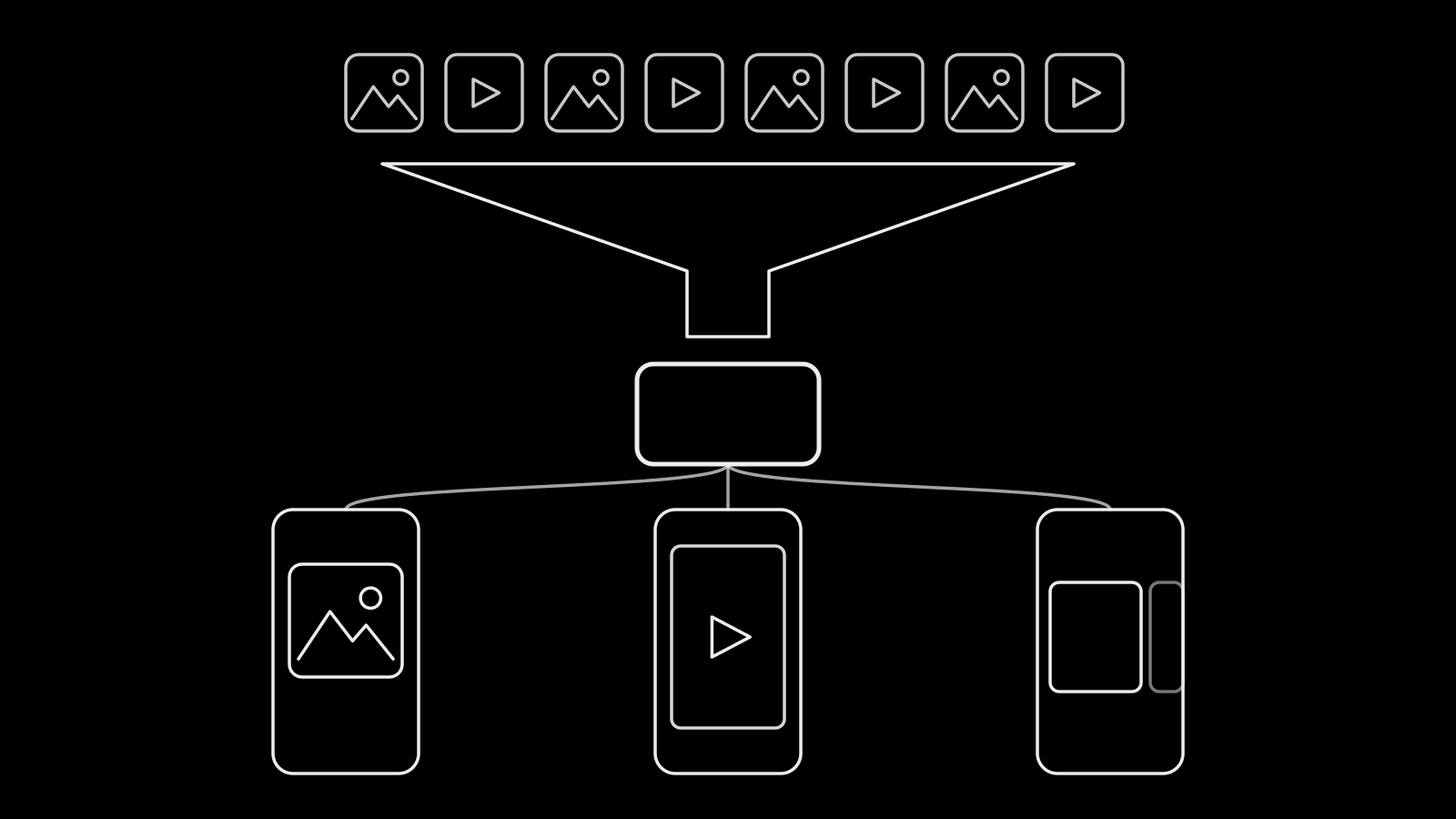
The flexible ad format lets you put up to 10 images and videos in a single ad, along with several text options. Meta's delivery system then decides, per impression, which asset to show and in what format: a single image, a video, or a carousel built from your images. You do not pick the format; delivery matches format to placement and person.
From Meta's documentation:
- It works at the ad level, so you can run flexible ads next to regular ads in the same ad set.
- It is available for the Sales and App promotion objectives.
- You can add up to 5 options per text type (primary text, headline, description).
- In the Marketing API, assets are organized into groups, and every group needs at least one image or video.
One caveat: in 2026, advertisers and tool vendors reported that Ads Manager moved the flexible option out of the format picker and into Advantage+ creative settings. Meta's API still documents the format. If your screen does not match older tutorials, check the creation flow in your own account.
Flexible format vs dynamic creative vs multi-advertiser ads
| Flexible ad format | Dynamic creative | Multi-advertiser ads | |
|---|---|---|---|
| Level | Ad | Ad set (toggle) | Ad (creative option) |
| What it does | Picks asset and format per impression | Mixes asset combinations per impression | Can show your ad in a unit alongside ads from other businesses |
| Ads per ad set | Many, mixed with regular ads | One | Not relevant |
| Objectives | Sales, App promotion | Several objectives, but no longer offered for Sales or App promotion in Ads Manager | Varies by objective and placement |
| Asset limits | Up to 10 media, 5 per text type | Up to 10 media, 5 per text type, multiple CTAs | Not an asset tool |
| Use it for | Scaling ads with format variety | Combination testing on objectives where flexible is not available | Extra reach; opt out if placement next to competitors bothers you |
Dynamic creative is the older approach: you switch it on at the ad set level, the ad set can hold only one ad, and Meta builds combinations of your images, videos, headlines, primary texts, descriptions, and calls to action. For Sales and App promotion campaigns, Meta replaced it with the flexible format in 2024, though it remains for some other objectives.
Multi-advertiser ads are unrelated to testing. When someone engages with an ad, Meta can show a scrollable unit of ads from other businesses, and yours can appear in those units. It is an Advantage+ creative option you can turn off per ad: a default to review, not a testing tool.
How many assets to use
The limit is 10 media, but loading 10 is rarely right.
- 3 to 6 media assets is a practical range for most budgets. Each asset needs enough impressions for delivery to judge it; at modest daily budgets, 10 assets means most of them barely run.
- Mix formats on purpose. Include at least one 9:16 video for Reels and Stories and one square or 4:5 image for Feed. The Facebook ad specs guide has the sizes.
- 2 to 3 text options per type is usually enough. Five primary texts times five headlines creates combinations nobody can read results for.
- Keep assets on one concept. A flexible ad works best as one message in several executions. Unrelated concepts in one ad compete for the same spend and hide which idea worked.
Reading asset-level results
In Ads Manager, open the flexible ad and use the Breakdown menu, then the dynamic creative element options (image, video, text, headline, description). The Marketing API exposes the same thing through asset breakdowns such as image_asset, video_asset, body_asset, and title_asset.
Read these results with care:
- Spend is not split evenly. Delivery pushes budget toward whatever looks best early. An asset with little spend has not lost; it was never tested.
- Breakdowns are directional. You get delivery and conversion metrics per asset, but not a controlled comparison. Two assets with a 20% CPA gap on uneven spend may not really differ.
- Watch spend share alongside CPA. An asset taking 70% of spend at an acceptable CPA is your working winner. An asset with a great CPA on 3% of spend is a hypothesis to test properly.
When to use it for testing, and when not to
Use the flexible format when:
- You are scaling a proven concept and want Meta to match formats to placements.
- You have format variants of one idea (video, static, carousel frames) and want each shown where it performs.
- Budget is limited and you would rather pool signal in one ad than split it across several that stay in the learning phase.
Do not use it when:
- You need a clean answer to "which creative is better." Uneven spend makes that impossible. Put each creative in its own ad, or run an A/B test, as laid out in Meta ads creative testing.
- You are testing concepts, not executions. Different angles belong in different ads so each gets its own delivery and its own read.
- You need per-asset reporting others will act on. If a result has to hold up in a client report, give it a controlled test.
A common structure: test concepts as separate ads in a testing campaign, then move each winning concept into a flexible ad in your scaling campaign with its best format variants.
Frequently asked questions
What is the flexible ad format on Facebook?
It is a Meta ad setup where you add up to 10 images and videos plus several text options to one ad, and Meta chooses which asset and which format (single image, video, or carousel) to show each person. It works at the ad level and is available for Sales and App promotion campaigns.
What is the difference between dynamic creative and flexible ads?
Dynamic creative is switched on at the ad set level, allows one ad per ad set, and mixes asset combinations including CTAs. The flexible format works at the ad level, lives alongside regular ads, and picks both the asset and the display format. Meta replaced dynamic creative with the flexible format for Sales and App promotion campaigns in 2024.
Is dynamic creative still available on Facebook?
Yes, for some objectives, but not for Sales or App promotion campaigns in Ads Manager, where the flexible format took its place. Meta's API documentation still covers dynamic creative for several objectives.
How do I see which asset performed best in a flexible ad?
In Ads Manager, use the Breakdown menu and choose the dynamic creative element options, such as image, video, text, or headline. Compare cost per result together with each asset's share of spend, because delivery does not split budget evenly.
Are flexible ads good for creative testing?
They are good for finding the best format and execution of one proven concept. They are poor for comparing different creatives head to head, because spend concentrates on early leaders. Use separate ads or an A/B test when you need a clear winner.
Flexible ads work best when the right assets are ready in every format. upload.ad keeps your approved images and videos in one library and sends them straight to your Meta and TikTok ad accounts. Start free.
Veikka Grundström, Founder
I build upload.ad, the creative library and review workflow media buying teams use to get ads from edit to live on Meta and TikTok. I write about the parts of that job that waste the most time: creative testing, platform specs, review approvals, and the API behaviour nobody documents properly.