Blog / · 6 min read
TikTok Pixel and Events API: setup and deduplication
 Veikka Grundström Founder, upload.ad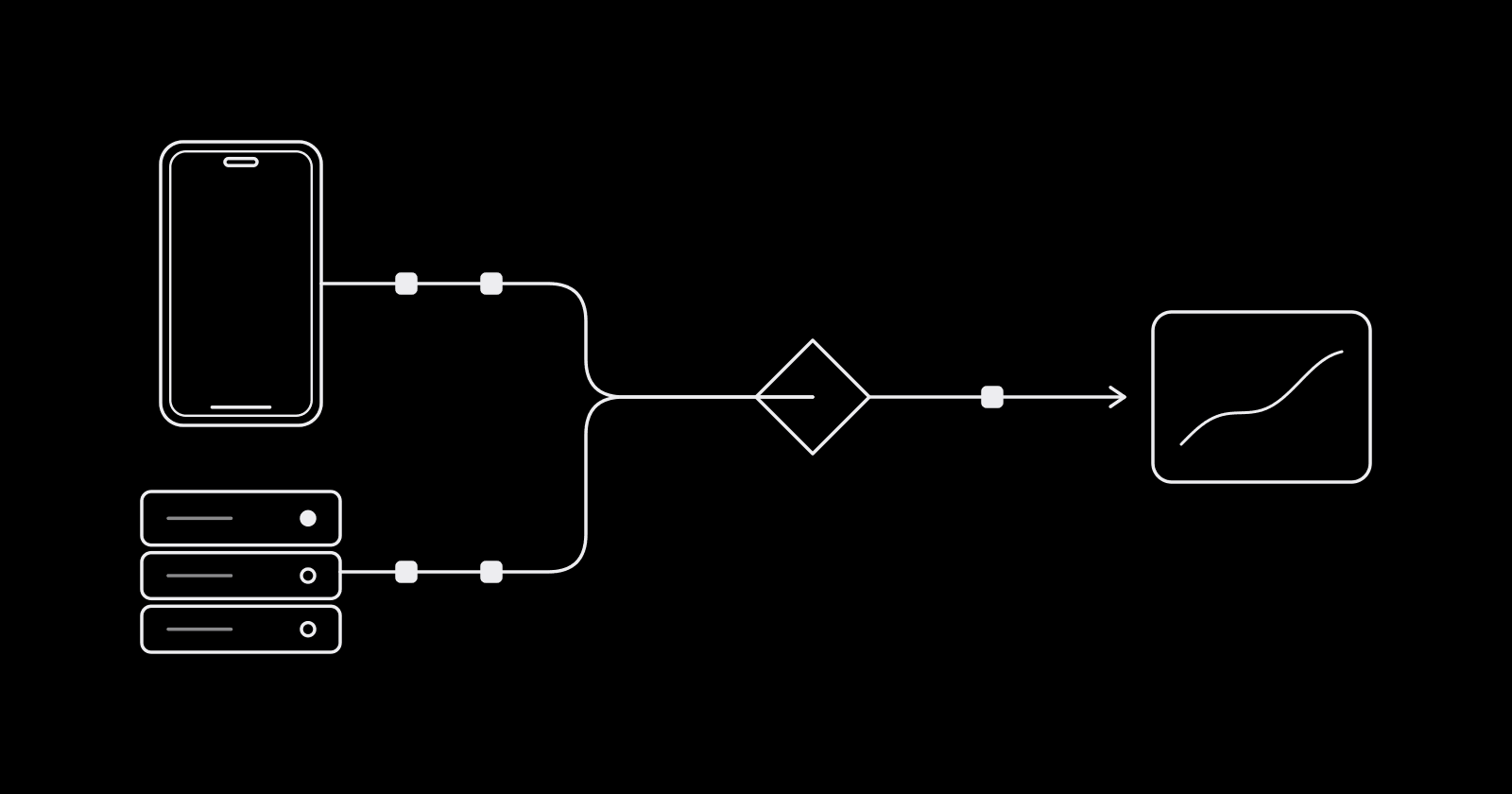
On this page
TikTok can only optimize toward the conversions it sees. If the pixel misses a chunk of your purchases (ad blockers, browser privacy limits, a checkout on another domain), the algorithm learns from a partial picture and your reporting undercounts what the ads actually did. The fix TikTok recommends is running the pixel and the Events API together, with deduplication set up so each conversion counts once.
Pixel vs Events API
The TikTok Pixel is a JavaScript snippet on your site. It fires events from the visitor's browser: page views, add to carts, purchases. The Events API is a server-to-server connection: your backend (or a partner integration) sends the same events directly to TikTok.
| TikTok Pixel | Events API | |
|---|---|---|
| Where it runs | Visitor's browser | Your server or a partner's |
| Setup effort | Low: paste code or use a partner app | Medium to high: backend work or a partner integration |
| Affected by ad blockers and browser limits | Yes | No |
| Channels | Web | Web, app, offline (in-store), CRM |
| Best for | Browser context: page views, clicks, click IDs, cookies | Reliable delivery of high-value events, offline and CRM events |
TikTok's own recommendation is both, with deduplication on. Either one alone qualifies you for the Web conversions objective, but together they cover each other's gaps: the pixel captures browser context the server never sees, and the server catches events the browser drops. Meta works the same way; see the Facebook Conversions API guide.
Standard events to send
TikTok updated its standard event names in 2025 to line up across web, offline, and CRM. Two renames matter for anyone following an older tutorial: CompletePayment is now Purchase and SubmitForm is now Lead. TikTok says the old names remain supported, so existing setups keep working, but use the new names on any new pixel.
The events most accounts need:
- ViewContent: product or key content page viewed
- Search: site search performed
- AddToCart: product added to cart
- AddToWishlist: product saved
- InitiateCheckout: checkout started
- AddPaymentInfo: payment details entered
- Purchase: order completed
- Lead: form submitted
- CompleteRegistration: account created
- Subscribe and StartTrial: subscription events
For commerce events, send value, currency (USD for a US store), and content parameters such as content_id and content_type. Without value and currency you cannot optimize for value or read ROAS.
Deduplication with event_id
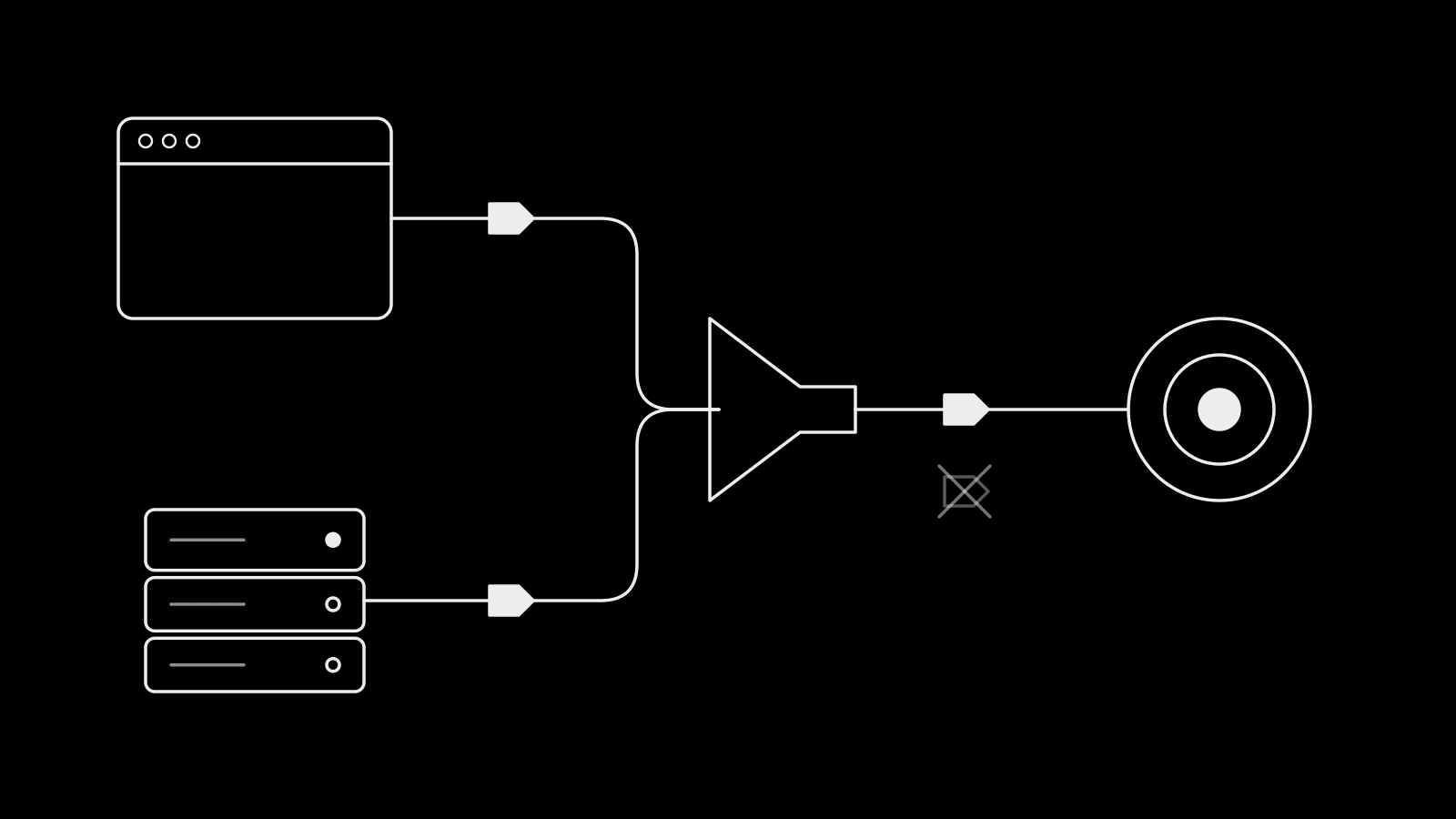
If the pixel and the Events API both report the same purchase and TikTok cannot tell they are the same, the purchase is counted twice. Your CPA looks better than it is and the algorithm optimizes toward inflated data.
TikTok deduplicates when two events share the same event name and the same event_id. The rules, per TikTok's help center:
- Pixel to pixel: duplicates with the same event and event_id within 48 hours of the first are dropped.
- Events API to Events API: same rule, 48-hour window.
- Pixel and Events API: matching events are merged or deduplicated within 48 hours of the first one received.
When duplicates are detected, TikTok keeps the first event received for reporting.
What this means in practice:
- Generate the event_id once, at the moment of the action. An order ID works well for Purchase; a generated UUID works for everything else.
- Send the identical value through both channels. The pixel call and the server call for one purchase must carry the same event_id and the same event name.
- Match event names exactly.
Purchasefrom the pixel andCompletePaymentfrom the server will not deduplicate against each other. - You only need deduplication for overlapping events. If the pixel sends only ViewContent and the server sends only Purchase, there is nothing to dedupe.
Matching: sending enough user data
Deduplication stops double counting; matching decides whether TikTok can connect an event to a person who saw an ad. The more identifiers each event carries, the more conversions get attributed.
- Click ID (
ttclid): appended to landing page URLs from TikTok ads. Capture it and pass it with server events. - Cookie (
_ttp): set by the pixel. Forward it with server events so they can be tied to the same browser. - Email and phone: hashed with SHA-256 before sending. The pixel's advanced matching can do this for you in the browser.
- External ID: your own customer ID, hashed.
- IP address and user agent: pass them from the original request, not from your server.
The most common gap is a server integration that sends a clean Purchase with no click ID, cookie, or email. TikTok receives the event but cannot attribute it. The concepts carry over from Meta's side, explained in event match quality.
Setup options
You do not need to write the integration yourself. TikTok offers three routes:
- Commerce partner integrations: Shopify, WooCommerce, and other store platforms can install the pixel and Events API from their TikTok app. On Shopify, TikTok's instructions are to set the data sharing level to Enhanced or Maximum, which turns on the server connection.
- Data partner integrations: tag managers, CDPs, and server-side tagging providers. TikTok's Google Tag Manager setup flow configures both pixel and Events API, with deduplication handled for you when you use TikTok's guided setup.
- Direct integration: your developers call the Events API with an access token generated in Events Manager. Most control, most work.
For most US stores on a major ecommerce platform, the partner integration is the right call. Go direct for custom checkouts, offline or CRM conversions, or events a partner app does not cover.
Testing with Test Events
Do not launch a campaign on an untested setup. In TikTok Events Manager, open your pixel and go to the Test Events tab.
- Pixel: enter your site URL to generate a QR code, scan it in the TikTok app, and click through your funnel on your phone. Events appear in real time.
- Events API: send server events with the test event code shown in the Test Events tab. They show up in the same view, and you can filter browser events from server events.
- Do one full test purchase. You should see one Purchase from the browser and one from the server with the same event_id, and one Purchase counted after deduplication. Two counted purchases means your event_id is not matching.
- Check parameters. Confirm value, currency, and content_id arrive on every commerce event. After launch, Events Manager diagnostics flag missing parameters and deduplication problems. Check them after any site or checkout change.
Frequently asked questions
Do I need both the TikTok Pixel and the Events API?
Either one is enough to run Web conversions campaigns, but TikTok recommends using both with deduplication. The pixel captures browser context such as click IDs and cookies, and the Events API delivers events that ad blockers and browser limits would drop.
How does TikTok deduplicate pixel and Events API events?
TikTok treats two events as duplicates when they share the same event name and the same event_id, arriving within 48 hours of the first. It keeps the first event received. Send the identical event_id from both the pixel and the server for each conversion.
What is the difference between CompletePayment and Purchase on TikTok?
They are the same event. TikTok renamed CompletePayment to Purchase (and SubmitForm to Lead) in 2025 to align event names across channels. The old names are still supported, but new setups should use Purchase and Lead.
How do I test TikTok Events API events?
In TikTok Events Manager, open your pixel, go to Test Events, and send server events with the test event code shown there. Events appear in real time next to pixel test events, so you can check that a single test purchase is counted once.
Clean tracking makes creative decisions trustworthy. upload.ad keeps your TikTok and Meta creatives, uploads, and results in one place so the winners are easy to spot and ship again. Start free.
Veikka Grundström, Founder
I build upload.ad, the creative library and review workflow media buying teams use to get ads from edit to live on Meta and TikTok. I write about the parts of that job that waste the most time: creative testing, platform specs, review approvals, and the API behaviour nobody documents properly.