Blog / · 6 min read
Facebook Conversions API: CAPI setup and deduplication
 Veikka Grundström Founder, upload.ad
On this page
If your Meta results only come from the pixel, you are optimizing on a partial picture. Ad blockers, browser tracking protections, cookie consent banners, and checkout pages that run on another domain all eat browser events before they reach Meta, and every lost purchase is a conversion the delivery system never learns from. The Conversions API (CAPI) is Meta's answer: send the same events from your server, where the browser cannot drop them.
Here is what CAPI actually does, how it works alongside the pixel without double counting, the setup routes worth considering, and the mistakes that make a "working" integration quietly useless.
What the Conversions API is
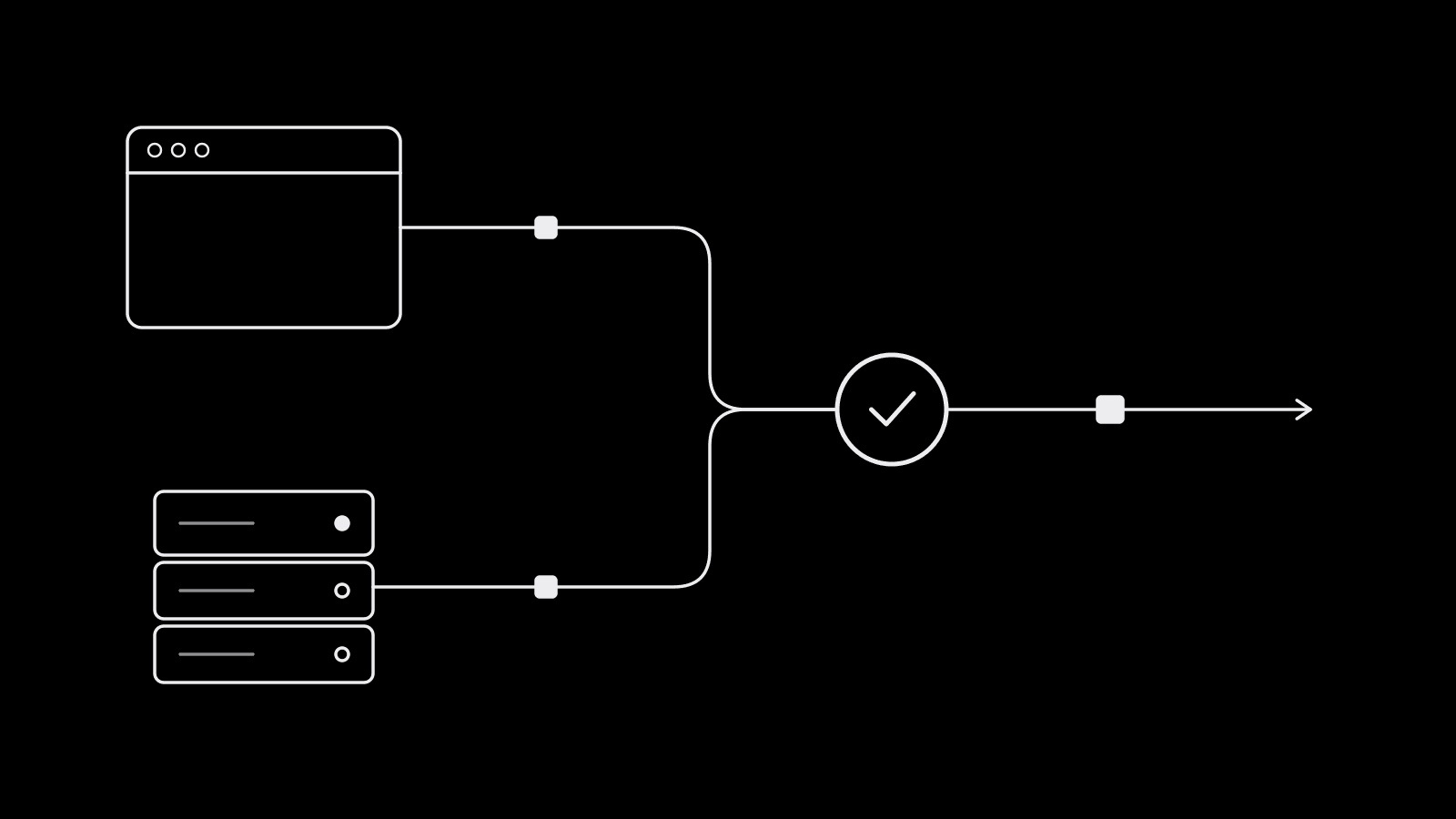
The Conversions API is a server-to-server connection between your website backend (or your ecommerce platform, CRM, or tag server) and Meta. When someone purchases, your server sends a Purchase event to Meta directly, with the order value, currency, and whatever customer information you have about the buyer.
The pixel does the same job from the visitor's browser. The two are designed to run together, and Meta recommends a redundant setup: pixel and CAPI both sending the same events, with deduplication so each conversion counts once.
| Meta Pixel | Conversions API | |
|---|---|---|
| Runs in | The visitor's browser | Your server or a partner's |
| Blocked by ad blockers and browser protections | Often | No |
Sees browser cookies (_fbp, _fbc) automatically | Yes | Only if you pass them |
| Can send offline, CRM, or delayed events | No | Yes, up to 7 days old |
| Customer information sent | What the browser has | Whatever your backend knows |
That last row matters more than people expect. Your server knows the email, phone, and address from the order. Sending those (hashed) is what lets Meta match the event to a person, which is the whole point. We cover that side in depth in event match quality.
Why run both instead of CAPI alone
Each channel catches events the other misses. The pixel sees on-site behavior your server may never log (a ViewContent on a cached product page, for example) and sets the browser cookies that carry click information. CAPI survives blockers and can include richer customer data. Running both gives Meta the most complete signal, and deduplication keeps the count honest.
Deduplication: the part everyone gets wrong
If the pixel and your server both send the same purchase and Meta cannot tell they are the same, it counts two purchases. Your reported ROAS doubles, your CPA looks amazing, and the optimization signal is garbage.
Meta deduplicates using two fields that must match across the browser and server event:
event_name: the same name on both sides.Purchaseandpurchaseare different events.event_id: a unique ID for that specific occurrence, identical in the pixel call and the server call. An order ID works well for purchases.
On the pixel side the ID is passed as eventID in the fbq('track', ...) call; on the server side it is the event_id field. Meta only deduplicates events that arrive within 48 hours of the first event with that ID, and when both versions carry similar content it generally keeps the one received first.
Setup routes
You have three practical options.
1. Partner integrations
Shopify, WooCommerce, BigCommerce, and most major ecommerce and CRM platforms have a built-in Meta integration that sends pixel and server events with deduplication handled for you. You connect it from Events Manager or from the platform's Meta app and choose the data-sharing level. For most stores this is the right answer: it is maintained by someone else and it breaks less.
2. Conversions API Gateway
The Conversions API Gateway is a Meta product that runs a small server-side instance in your own cloud account (or through a hosting partner) and mirrors your pixel events to the Conversions API without writing code. It is a good fit when your site is custom but you have no developer time. Meta has also introduced Signals Gateway, a broader first-party data hub that can route events to Meta and other destinations; it is newer, and whether it suits you depends on how much you want to centralize data flows.
3. Direct integration
Your developers call the Conversions API endpoint from your backend (or through a server-side tag manager like server-side Google Tag Manager). This gives full control: you choose which events to send, what customer data to attach, and can include offline or CRM events such as qualified leads or subscription renewals.
| Route | Effort | Control | Best for |
|---|---|---|---|
| Partner integration | Low | Low to medium | Stores on a major platform |
| Conversions API Gateway | Low to medium | Medium | Custom sites without dev time |
| Direct integration | High | Full | Custom stacks, lead gen with CRM stages |
Common mistakes
These are the issues that show up again and again in account audits:
- Missing or mismatched
event_id. The pixel sends one ID format, the server another, or the server sends none. Result: double counting. Check deduplication in Events Manager before you trust any ROAS number. - Not passing
fbpandfbc. The server does not see browser cookies unless you read them from the request and forward them. Withoutfbc, the event loses the click that brought the person in. - Sending IP and user agent from your server instead of the visitor.
client_ip_addressandclient_user_agentmust be the customer's, captured from their request. Sending your own server's IP poisons matching. - Hashing the wrong things. Email, phone, name, and address fields must be normalized and SHA-256 hashed.
fbp,fbc, IP address, and user agent must not be hashed. - Wrong
event_time. Use the time the event happened, in Unix seconds. Events older than 7 days are rejected. - Currency and value mismatches. The pixel sends
29.99and the server sends2999, or one sends tax-inclusive totals and the other does not. Pick one definition of value and use it everywhere. - Ignoring consent. Server-side events still fall under your privacy obligations. Respect the same consent choices you apply to the pixel, especially for EU and UK visitors.
Better signal helps the delivery system learn, but it does not fix a learning phase problem caused by too many ad sets splitting too little budget.
Frequently asked questions
Do I still need the Meta pixel if I use the Conversions API?
Meta recommends running both. The pixel captures browser behavior and sets the _fbp and _fbc cookies that carry click data, while the Conversions API delivers events that browsers block. With matching event_id and event_name, Meta deduplicates them so each conversion counts once.
How do I know if pixel and CAPI events are deduplicated?
In Events Manager, open your dataset, select an event such as Purchase, and check the event details for deduplication and event coverage. If server and browser events show matching deduplication keys, it is working. If purchases in Ads Manager suddenly jump well above your actual orders, deduplication is likely broken.
Is the Conversions API free?
Yes. Meta does not charge for sending events through the Conversions API. Costs come from whatever you use to send them: a partner app, cloud hosting for the Conversions API Gateway, or developer time for a direct integration.
How long does it take for the Conversions API to improve results?
Events show up in Events Manager within minutes, but performance effects take longer because the delivery system needs new conversion data to learn from. Judge the change over a few weeks of stable spend, not the first few days.
Clean signal is half the battle; the other half is getting enough strong creative in front of it. upload.ad keeps your team's creatives, reviews, and launches in one place and sends approved batches straight into Meta and TikTok. Start free.
Veikka Grundström, Founder
I build upload.ad, the creative library and review workflow media buying teams use to get ads from edit to live on Meta and TikTok. I write about the parts of that job that waste the most time: creative testing, platform specs, review approvals, and the API behaviour nobody documents properly.